Skip to content
Thai Embassy Document Request · Identity & Location

ICAO-Standard Photo Taken Within 6 Months

Get your DTV visa photo right: the exact DTV ICAO photo requirements — taken within 6 months, white background, neutral expression — so the embassy accepts it first time.
DTVDTVThaiVisa 13 min read

You've received a “Request for Further Document” asking for an ICAO-standard photograph taken within the last six months . This is one of the most common—and easiest to fix—requests from the Royal Thai Embassy / Consulate-General when processing your Destination Thailand Visa. A compliant photo is essential because it will appear directly on your DTV and be used for identity authentication at the border. In this guide, we’ll walk you through exactly how to take and submit a photo that meets every requirement, so you can respond confidently and keep your application moving.

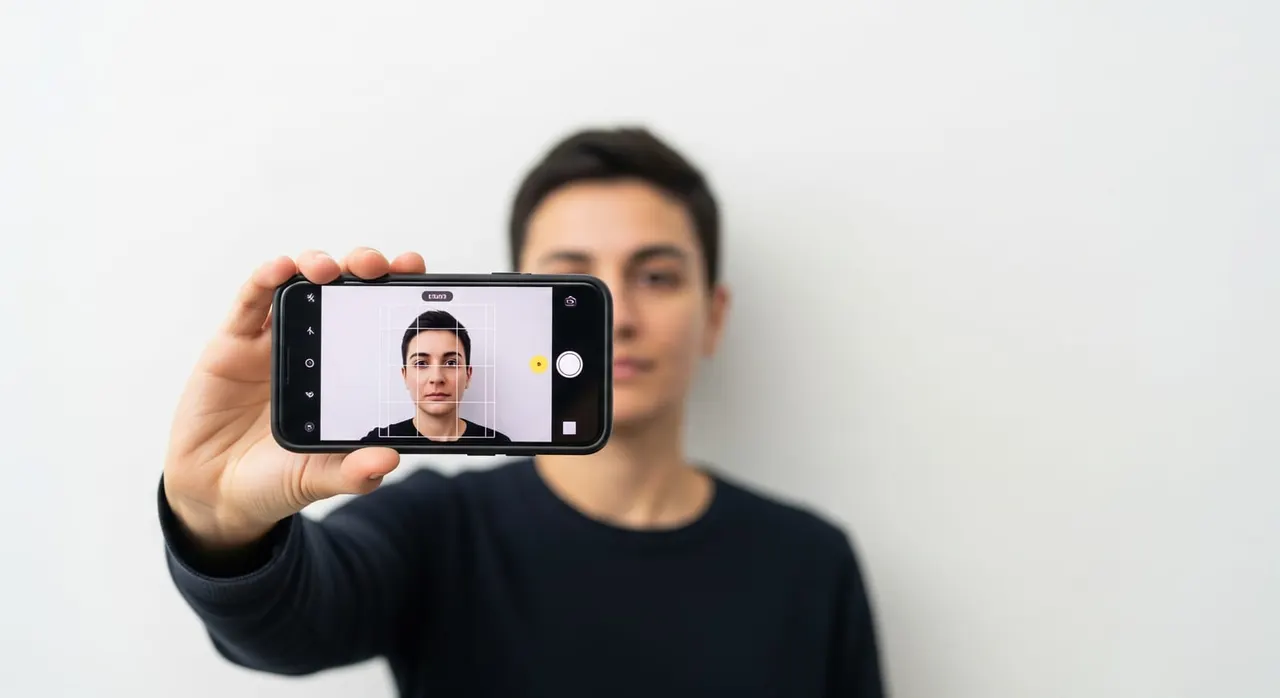
A traveler holding a smartphone at arm's length, taking a selfie with a neutral facial expression against a plain white wall, demonstrating how to capture an ICAO-standard DTV visa photo.

What the embassy asked

The embassy has flagged your submitted photograph because it does not fully comply with the specifications for the visa image. They need a fresh, formal headshot that can be printed on your DTV and used to verify your identity.

“Photograph taken within the last six months.: Your photo will be shown on your visa and used for authentication methods. Please upload new photo. Recommend you to use mobile phone to take a selfie photo (clear and focus and look straight up at camera please) in front of plain white background.”

Why the embassy asks for this

The Destination Thailand Visa is an electronic visa, but the photograph you provide becomes the actual image printed on the visa sticker or embedded in the digital record. Border officials use it to confirm that you are the authorized visa holder. If the photo is outdated, blurry, of poor quality, or fails to meet the International Civil Aviation Organization (ICAO) biometric standards, it cannot serve as a reliable authentication tool. That is why officers are specifically instructed to request a new, compliant photo before they can finalize your visa. A good photo helps avoid delays and ensures a smooth entry into Thailand.

How to provide it correctly

  1. Take a NEW photo within the last six months — do not reuse your passport photo or any older image.
  2. Use the embassy's own recommended method: have someone take it, or take a selfie on a mobile phone, looking straight into the camera, clear and in focus, against a plain white wall or backdrop with even lighting and no shadows.
  3. Adopt a formal, neutral, non-smiling expression with your mouth closed and both eyes open and fully visible, head facing straight forward and not tilted (ICAO Doc 9303 standard).
  4. Frame it as a true 2-inch ID-style headshot — head and upper shoulders centred, face filling roughly 70-80% of the frame from chin to crown, nothing cropping the top of the head.
  5. Remove hats, headbands and non-religious head coverings; if you wear glasses use clear lenses with no glare and frames that do not cover the eyes (removing glasses is safest).
  6. Save it as a JPEG with the white background truly white (not cream, grey, or light blue), check it is sharp and well-lit at full size, then send it to us — our team uploads it to the e-Visa portal exactly where the request specifies.
  7. Send us only the corrected photo and we reply to the embassy's Request for Further Document for you — nothing else that was not asked for is submitted.
  8. Before resubmitting, open the image at 100% and confirm there are no shadows behind the head, no colour cast on the background, and the face is the most prominent element.
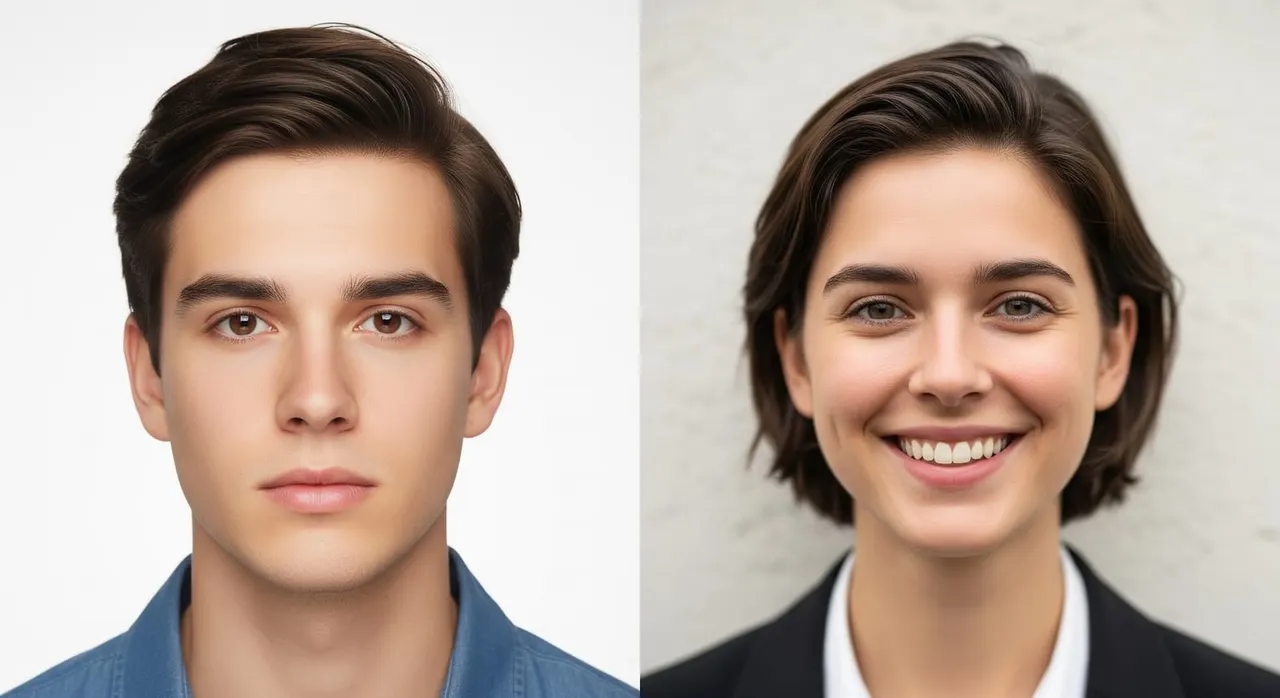
Side-by-side example: a correct DTV visa photo with neutral face, white background, and centered head; and an incorrect photo with a smile, off-white wall, and shadow behind the head.

Common mistakes that cause rejection

  • Assuming any neutral headshot is fine and uploading a months-or-years-old photo, when the officer needs one taken within the last six months.
  • Using a background that looks white to the eye but is actually cream, grey, or blue-tinted — the portal's automated check and reviewing officer reject it.
  • Smiling naturally for the camera, when the request demands a formal non-smiling expression with mouth closed.
  • Shooting too close, too far, or with the head cropped, so the face fails the ICAO 70-80% frame proportion.
  • Letting shadows fall on the wall behind the head from a single overhead light or window instead of using flat, even lighting.
  • Over-correcting a Request for Further Document by sending extra unrequested documents along with the new photo — submit only the corrected photo that was asked for.

Frequently asked questions

How recent does my DTV visa photo have to be?

It must have been taken within the last six months. The embassy explicitly asks for a current photo because it 'will be shown on your visa and used for authentication,' so you cannot reuse an older or passport photo.

Can I just take the photo myself with my phone?

Yes. The embassy's own guidance recommends using a mobile phone to take a clear, in-focus selfie, looking straight into the camera, in front of a plain white background — as long as it meets the formal, non-smiling, ICAO standard.

What does 'ICAO photo standard' actually mean here?

It refers to the international biometric-photo rules (ICAO Doc 9303): a front-facing headshot, neutral non-smiling expression, mouth closed, both eyes open and visible, even lighting with no shadows, plain white background, and the face filling roughly 70-80% of the frame.

Why was my photo refused when it looked fine to me?

The most common triggers are a background that is not truly white (cream, grey, or blue), shadows behind the head, a smile, an out-of-date photo, or low sharpness. Any of these can be enough for the reviewing officer to ask you to upload a new, compliant photo.

My photo was rejected — do I have to re-do the whole DTV application?

No. A photo issue normally comes as a Request for Further Document asking for a new compliant photo on the e-Visa portal. You just send us the corrected photo and our team resubmits it for you; only what was asked is provided, nothing extra.

Can I wear my glasses or a head covering in the photo?
Remove hats and headbands. Glasses should ideally be removed; if worn, lenses must be clear with no glare and not cover the eyes. Head coverings are only acceptable for documented religious reasons and must not obscure the face.

Get this document right the first time

Let our team prepare and check your response to the embassy — apply from $139, with a 100% refund if denied (with the optional Denial Protection add-on).

Start your application

General guidance only — not legal advice. Thai embassy requirements vary by office and change over time; always confirm the exact wording in your own request email, or let our team check it for you.

Related document requests